OwlGuardian SMS Consent & Opt-In Flow
Last updated: May 27, 2026
This page documents OwlGuardian's complete SMS opt-in flow with screenshots, for review by carriers, regulators, and the Campaign Registry. It supplements the SMS section of our Privacy Policy and Terms of Service.
About OwlGuardian
Brand: OwlGuardian
Service: An email security service that protects vulnerable individuals (typically older adults) from email scams. A trusted family member ("Trusted Contact") sets up monitoring on behalf of the protected user ("Monitored User").
SMS purpose: Account verification, security alerts, and account notifications only. OwlGuardian does not send marketing or promotional text messages.
Message frequency: 1–4 messages per month, varying based on account activity.
Carrier disclaimer: Message and data rates may apply. OwlGuardian does not charge for SMS; any charges are assessed by your mobile carrier.
Two consent moments
OwlGuardian shows an SMS consent checkbox to each person who enters a phone number. The checkbox is optional and unchecked by default — it does not gate the button that requests a verification code, which is enabled as soon as a valid phone number is entered. Tapping that button requests a one-time, transactional verification text; checking the consent box additionally opts the person into ongoing OwlGuardian messages (security alerts, account notifications).
- Opt-in moment #1 — Trusted Contact: in the OwlGuardian iOS app, the TC enters their own phone number; the optional SMS consent checkbox is shown on that screen, unchecked by default.
- Opt-in moment #2 — Monitored User: after the TC shares an invitation link, the MU enters their own phone number on the OwlGuardian onboarding page; the same optional SMS consent checkbox is shown there, unchecked by default.
Consent #1 — Trusted Contact (in-app checkbox)
In the OwlGuardian iOS app, the Trusted Contact enters their own phone number. The SMS consent box is shown on the same screen; it is optional and unchecked by default. The "Send code" button is enabled as soon as a valid phone number is entered, regardless of the checkbox.
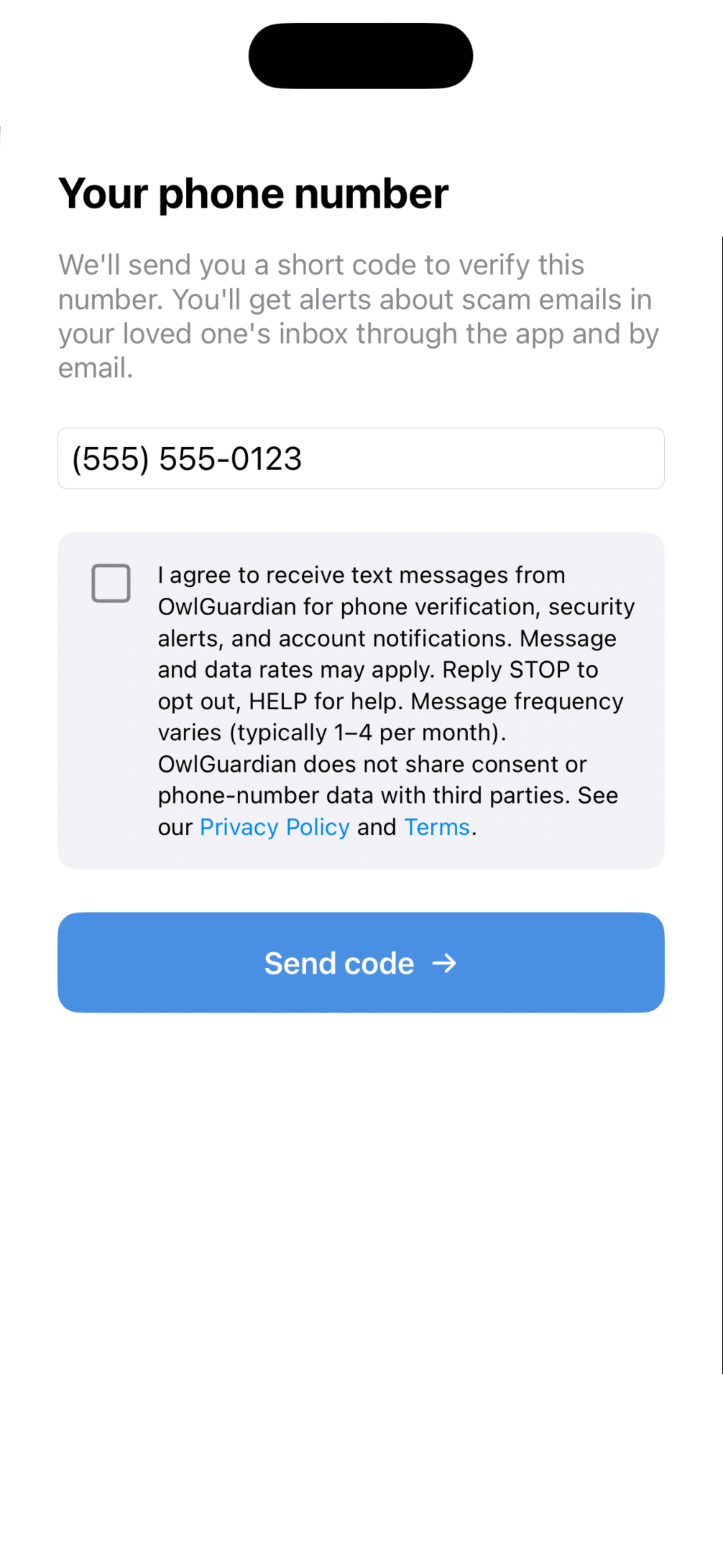
The Trusted Contact's phone-entry screen in the OwlGuardian iOS app. The consent box is optional and unchecked by default; "Send code" is enabled once a valid phone number is entered.
Verbatim disclosure shown to the Trusted Contact:
"I agree to receive text messages from OwlGuardian for phone verification, security alerts, and account notifications. Message and data rates may apply. Reply STOP to opt out, HELP for help. Message frequency varies (typically 1–4 per month). OwlGuardian does not share consent or phone-number data with third parties."
Between consent #1 and consent #2: link delivery
After the Trusted Contact submits the invitation, OwlGuardian generates a unique invite link of the form:
https://owl-guardian-i-os-v2-console.vercel.app/onboard/[tokenId]
The Trusted Contact shares this link with the Monitored User personally — typically via iMessage, SMS from their own phone, or any other means they choose. OwlGuardian does not send any SMS at this step; the TC's iMessage to the MU is sent from the TC's own phone, not from OwlGuardian's infrastructure.
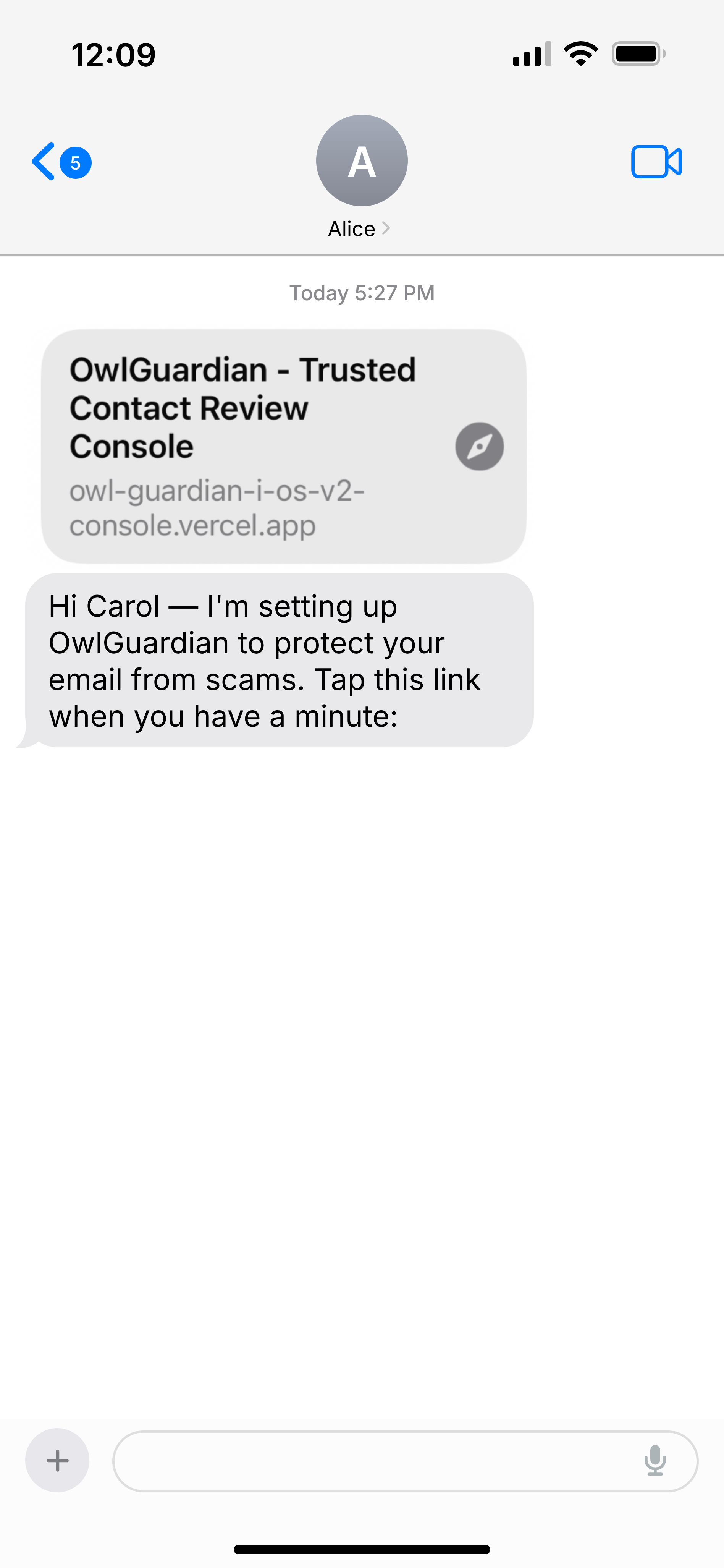
Example of how the TC delivers the invitation link to the MU. Sent via the iOS share sheet from the TC's own phone — not via OwlGuardian's SMS infrastructure.
Consent #2 — Monitored User (public web page)
When the Monitored User taps the invitation link, they land on a public OwlGuardian web page. The page presents:
- An optional SMS consent checkbox with the full disclosure language (frequency, msg & data rates, HELP, STOP, privacy); unchecked by default
- A phone number field
- A "Send verification code" button, enabled as soon as a valid US phone is entered (regardless of the consent checkbox)
The screenshot below shows this page exactly as the Monitored User sees it after tapping their personal invitation link. (The link itself is unique per invitation and identity-gated, so the live page is reached through a real invite rather than a shared URL.)
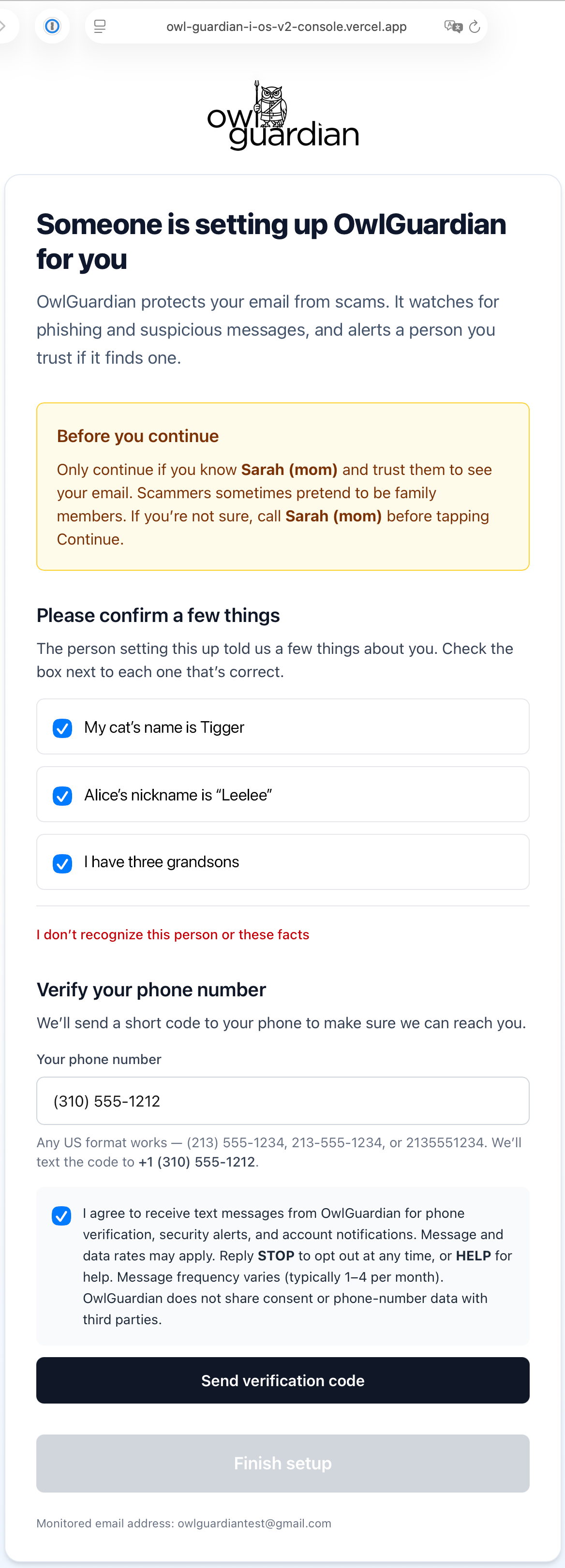
The public OwlGuardian onboarding page that the Monitored User reaches after tapping the invitation link. The SMS consent checkbox is optional and unchecked by default; the verification button is enabled as soon as a valid phone number is entered.
Verbatim consent text shown to the Monitored User on the web page:
"I agree to receive text messages from OwlGuardian for phone verification, security alerts, and account notifications. Message and data rates may apply. Reply STOP to opt out at any time, or HELP for help. Message frequency varies (typically 1–4 per month). OwlGuardian does not share consent or phone-number data with third parties."
Links to the Privacy Policy and Terms of Service are visible on the same page.
Phone verification (Twilio Verify OTP)
After the Monitored User enters their phone number and taps "Send verification code" (with or without checking the optional consent box), OwlGuardian's backend calls Twilio Verify, which sends a one-time 6-digit code via SMS to the entered phone number. The Monitored User enters that code on the same web page to complete verification.
The Twilio Verify SMS is templated by Twilio and delivered from the OwlGuardian sender; its content is brief and does not contain marketing material. Once the Monitored User has entered the code successfully, the invitation is consumed and the account is linked.
HELP and STOP behavior
- STOP — Replying STOP, STOPALL, UNSUBSCRIBE, CANCEL, END, or QUIT to any OwlGuardian SMS immediately ends all messages to that number. The user receives a one-time confirmation message: "OwlGuardian: You have been unsubscribed and will not receive any more messages. Reply START to resubscribe." Email monitoring on the associated account is also paused, and the linked Trusted Contact is notified that monitoring has been revoked.
- HELP — Replying HELP, INFO, or AIDE returns: "OwlGuardian: Email scam protection. For support, email support@owlguardian.net or visit owlguardian.net. Reply STOP to opt out. Msg&data rates may apply."
What we send via SMS
- Verification codes — one-time 6-digit codes via Twilio Verify when the Monitored User completes phone verification on the public web page above.
- Security alerts — account-security messages, such as confirmation that monitoring has been started, paused, or revoked. (Alerts about specific scam emails in the monitored inbox are delivered in the OwlGuardian app and by email, not by SMS.)
- Account notifications — sign-in alerts, monitoring-paused alerts, configuration changes.
- Opt-out and HELP acknowledgments — one-time replies to STOP and HELP keywords.
OwlGuardian does not send marketing, promotional, third-party advertising, or affiliate-promotion SMS.
What we do not share
No mobile information will be shared with third parties or affiliates for marketing or promotional purposes. Information sharing with subcontractors who directly support our messaging operations (specifically our SMS delivery provider, Twilio) is permitted in support of those operations. All other categories of personal information exclude text messaging originator opt-in data and consent — this information will not be shared with any third parties.
We do not sell, rent, or trade phone numbers or SMS opt-in data to any third party.
Required CTA elements (checklist for verification)
This page contains:
- ✅ Brand name: OwlGuardian
- ✅ Program description: account verification, security alerts, account notifications
- ✅ Message frequency: 1–4 per month
- ✅ Message & data rates disclaimer: "Message and data rates may apply"
- ✅ HELP instructions: Reply HELP for help / email support@owlguardian.net
- ✅ STOP instructions: Reply STOP to opt out
- ✅ Privacy Policy: owlguardian.net/privacy
- ✅ Terms of Service: owlguardian.net/terms
- ✅ Verbatim disclosure language for both consent moments
- ✅ Screenshots of both opt-in moments (each showing the optional consent box, unchecked by default, with the Send-code button enabled once a valid phone number is entered) + the link-delivery step
- ✅ Optional opt-in, not a condition of service: the consent checkbox is shown to each recipient on the screen where they enter their own number, is unchecked by default, and does not gate the Send-code button
Contact
For questions about OwlGuardian's SMS practices, email support@owlguardian.net.